
Host and Run Qwen3.8-Flash Locally: Complete Unsloth and llama.cpp Deployment Guide
In this article
- Architectural Profile & Hardware Requirements
- Sampling Parameters & Reasoning Controls
- Reasoning Effort & Thinking Preservation
- Quantization Analysis & Precision Retention
- Deployment Option 1: Unsloth Desktop & CLI
- 1. Installation
- 2. Launching Inference
- Deployment Option 2: llama.cpp Setup & Execution
- 1. Compiling llama.cpp
- 2. Executing CLI Inference
- Multi-Token Prediction (MTP): Accelerating Inference up to 1.7x
- Shared MTP Modules vs. General MTP
- MTP Total Hardware Footprint
- Step-by-Step MTP Setup with llama.cpp
- Frontier Benchmarks
- Summary & Related Local AI Workflows
Deploying frontier-grade open-weights language models on consumer and workstation hardware has reached an inflection point with Qwen3.8-Flash. Traditionally, serving massive parameter models locally required either multiple high-end enterprise GPUs with hundreds of gigabytes of VRAM or suffered catastrophic latency penalties when offloading layers across PCIe buses to system RAM.
Qwen3.8-Flash changes this equation through an architectural paradigm shift. By leveraging Per-Layer Embeddings (PLE) and N-gram lookup tables, memory bandwidth demands during inference are decoupled from pure GPU VRAM speed. As a result, inference executed directly on high-capacity system RAM or Apple Silicon unified memory yields performance remarkably close to discrete GPU VRAM.
In this guide, we walk through the complete deployment workflow for Qwen3.8-Flash: examining minimum hardware and memory offload thresholds, configuring hybrid thinking parameters, analyzing quantization loss via Kullback–Leibler Divergence (KLD), launching via one-click CLI tools, and unlocking up to 1.7x inference speedups using Multi-Token Prediction (MTP) in llama.cpp.
Architectural Profile & Hardware Requirements
Running Qwen3.8-Flash requires understanding its distinct memory footprint. Because the model integrates extensive N-gram lookup structures (PLE), its lower-bound quantization memory requirements are larger than standard dense models. However, because these N-gram layers act as lookup tables rather than deeply chained matrix multiplications, they retain near-original precision even at lower bit-widths and can be memory-mapped (mmap) to fast NVMe SSD storage to dramatically reduce active RAM and VRAM occupancy.
The minimum hardware baseline requires 75 GB of RAM or unified memory for the 1-bit quantized checkpoint (UD-IQ1_S). For production stability and long context handling, systems equipped with 96 GB to 128 GB of unified memory (such as Apple Mac Studio M-series machines or NVIDIA DGX Spark systems) provide optimal headroom.
| Quantization Format | Memory Requirement (RAM + VRAM / Unified Memory) | Recommended Hardware Target |
|---|---|---|
| 1-bit (UD-IQ1_S / UD-IQ1_M) | 75 GB | 96 GB Mac Studio / Workstation RAM |
| 2-bit (UD-Q2_K_XL) | 79 GB | 96 GB Unified Memory |
| 3-bit (UD-IQ3_XXS / UD-Q3_K_XL) | 90 GB | 96 GB – 128 GB System RAM / Mac |
| 4-bit (UD-IQ4_XS / UD-Q4_K_XL) | 96 – 114 GB | 128 GB Unified Memory / Multi-GPU Server |
| 5-bit (UD-Q5_K_XL) | 163 GB | 192 GB Mac Studio / 2x 96GB GPUs |
| 8-bit (Q8_0 / UD-Q6_K_XL) | 200 GB | 256 GB Workstation RAM / 4x A100 / H100 |
| BF16 (Unquantized) | 355 GB | 512 GB Server RAM / 8x 80GB VRAM Cluster |
[!NOTE] If configuring Multi-Token Prediction (MTP) for speculative decoding acceleration, budget an additional 1 GB to 2 GB of memory headroom for the draft module weights. For detailed hardware pricing and cluster sizing, refer to our GPU Cloud Pricing Guide.
Sampling Parameters & Reasoning Controls
Qwen3.8-Flash features a hybrid reasoning engine. Depending on the complexity of your task, the model operates either in deep analytical thinking mode (outputting step-by-step reasoning tokens before the final response) or in direct instruction mode.
The model natively supports an expansive context window of up to 262,144 tokens. Sampling parameters must be adjusted based on the active mode:
| Sampling Parameter | Thinking Mode (Analytical) | Instruct Mode (Non-Thinking) |
|---|---|---|
temperature |
1.0 | 0.7 |
top_p |
0.95 | 0.80 |
top_k |
20 | 20 |
min_p |
0.0 | 0.0 |
presence_penalty |
0.0 | 1.5 |
repetition_penalty |
1.0 | 1.0 |
| Context Length | Up to 262,144 tokens | Up to 262,144 tokens |
Reasoning Effort & Thinking Preservation
When deploying conversational pipelines, Qwen3.8-Flash exposes two critical control switches:
-
Reasoning Effort (
reasoning_effort): Adjusts the search depth of intermediate reasoning traces to balance token cost against accuracy:xhigh(Default): Maximum reasoning depth for complex math, symbolic logic, and autonomous coding tasks.medium: Balanced reasoning depth for general analysis and document synthesis.low: Low-latency, condensed reasoning optimized for speed and strict token budgets.
-
Preserve Thinking: Preserves the thinking trace generated during preceding conversational turns in multi-turn contexts. While retaining previous thoughts consumes additional context tokens, it prevents context drift and boosts accuracy in sustained technical troubleshooting.
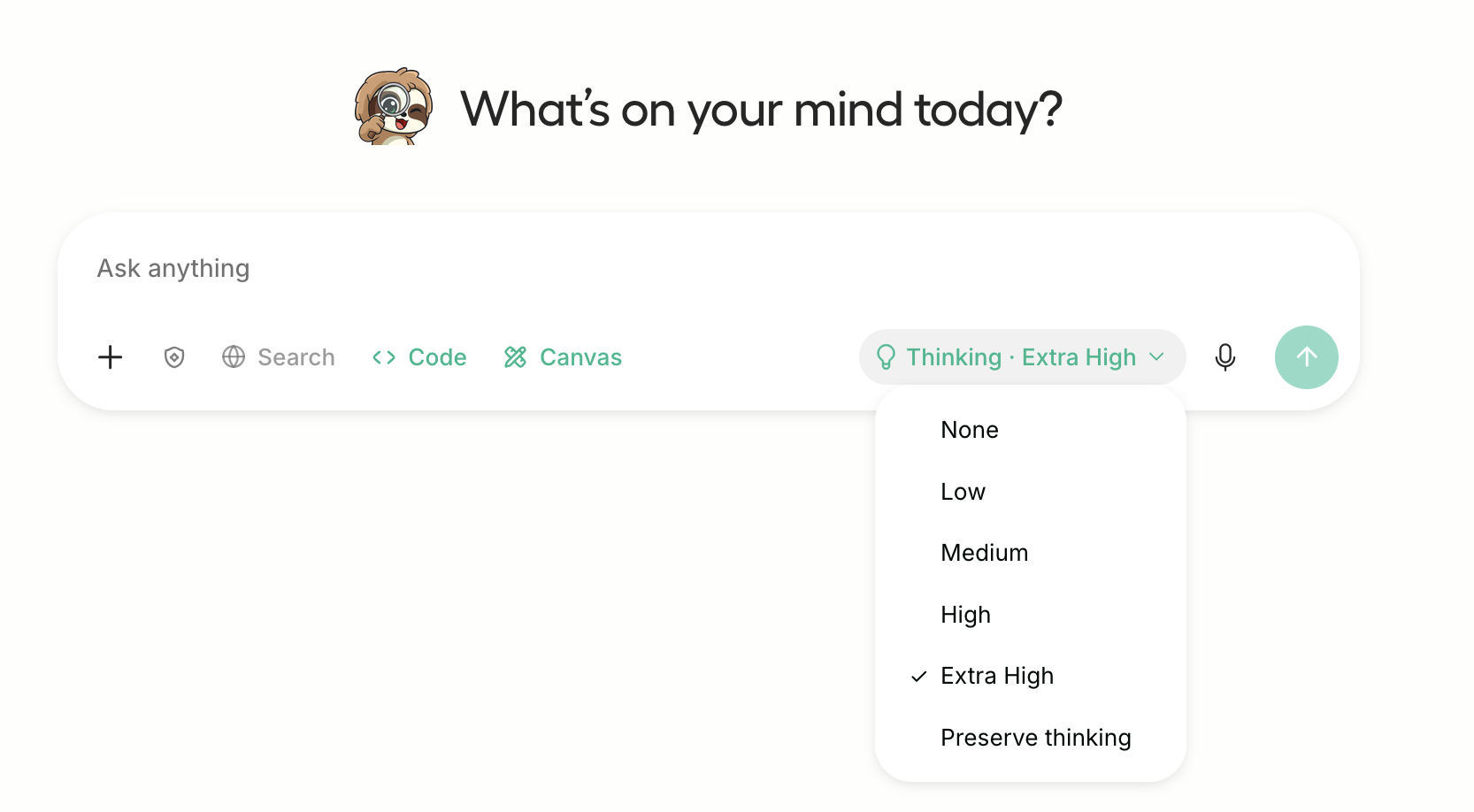
To set the reasoning effort programmatically in llama-server or CLI tools, pass the chat template kwargs flag:
Linux / macOS Bash:
--chat-template-kwargs '{"reasoning_effort":"medium"}'
Windows PowerShell:
--chat-template-kwargs "{\"reasoning_effort\":\"medium\"}"
Quantization Analysis & Precision Retention
Standard quantization methods often degrade models with large lookup layers because random memory access patterns are sensitive to aggressive truncation. For Qwen3.8-Flash, the PLE/N-gram structures remain uncompressed below 4-bit, ensuring that the model's core vocabulary lookup preserves semantic fidelity.
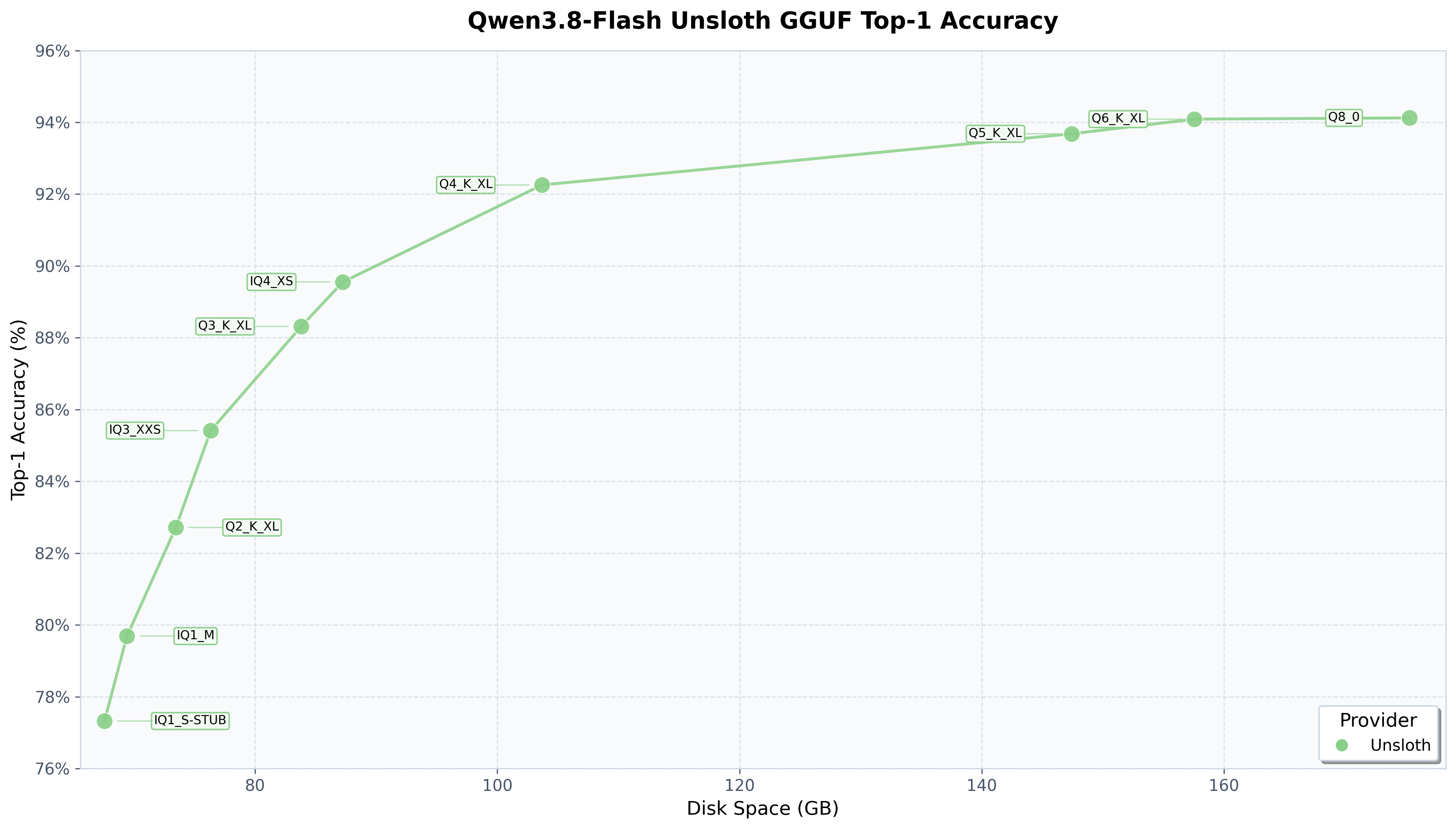
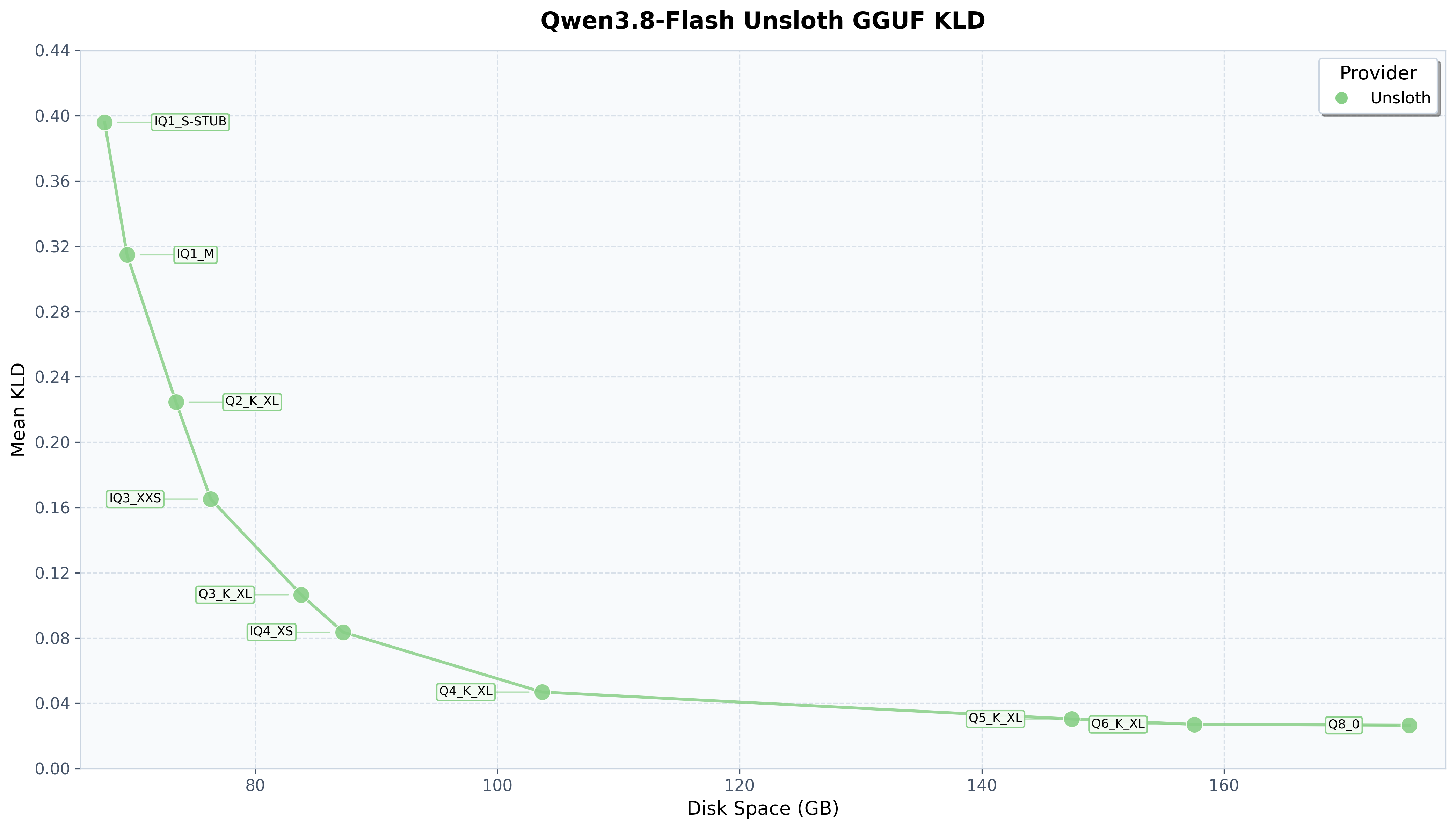
Benchmarking via Kullback–Leibler Divergence (KLD) confirms that the model recovers over 80% of its top-1 prediction accuracy with a 79% reduction in disk storage requirements:
| Quant Format | Disk Size (GB) | Top-1 Accuracy Recovery (%) | Mean KLD | 99.9% KLD |
|---|---|---|---|---|
UD-IQ1_S |
72.5 GB | 77.33% | 0.396070 | 7.2126 |
UD-IQ1_M |
74.5 GB | 79.69% | 0.314739 | 6.1965 |
UD-Q2_K_XL |
78.9 GB | 82.72% | 0.224607 | 4.9121 |
UD-IQ3_XXS |
82.0 GB | 85.41% | 0.165120 | 4.0375 |
UD-Q3_K_XL |
90.0 GB | 88.32% | 0.106504 | 3.0538 |
UD-IQ4_XS |
93.7 GB | 89.55% | 0.083630 | 2.3677 |
UD-Q4_K_XL (Sweet Spot) |
111.3 GB | 92.26% | 0.046893 | 1.5468 |
UD-Q5_K_XL |
158.3 GB | 93.68% | 0.030415 | 1.0036 |
UD-Q6_K_XL |
169.2 GB | 94.09% | 0.027091 | 0.8416 |
Q8_0 |
188.2 GB | 94.12% | 0.026574 | 0.8118 |
The accuracy recovery and divergence loss curves illustrate the inflection point at 4-bit XL (UD-Q4_K_XL), where divergence drops below 0.05 while retaining 92.26% top-1 accuracy:
Deployment Option 1: Unsloth Desktop & CLI
For developers seeking an automated runtime that handles memory mapping, automatic RAM offloading, and multi-GPU partitioning transparently, Unsloth provides native zero-configuration support.
1. Installation
Linux & macOS:
curl -fsSL https://unsloth.ai/install.sh | sh
Windows PowerShell:
irm https://unsloth.ai/install.ps1 | iex
2. Launching Inference
Run the balanced 4-bit XL checkpoint directly via the Unsloth runtime:
unsloth run --model unsloth/Qwen3.8-Flash-Next-GGUF:UD-Q4_K_XL
The runtime detects available system RAM and GPU VRAM, balances N-gram layers across memory tiers, and serves an interactive prompt interface.
Deployment Option 2: llama.cpp Setup & Execution
For bare-metal production deployments, containerized microservices, or custom inference pipelines, building llama.cpp from source provides fine-grained control over compiler flags and memory architectures.
1. Compiling llama.cpp
Install prerequisites and build the release binaries with hardware acceleration:
apt-get update
apt-get install pciutils build-essential cmake curl libcurl4-openssl-dev -y
git clone https://github.com/ggml-org/llama.cpp
cmake llama.cpp -B llama.cpp/build \
    -DBUILD_SHARED_LIBS=OFF -DGGML_CUDA=ON
cmake --build llama.cpp/build --config Release -j --clean-first --target llama-cli llama-mtmd-cli llama-server llama-gguf-split
cp llama.cpp/build/bin/llama-* llama.cpp
[!TIP]
- CPU-Only Systems: Change
-DGGML_CUDA=ONto-DGGML_CUDA=OFF.- Apple Mac / Metal Systems: Set
-DGGML_CUDA=OFF. Metal acceleration (-DGGML_METAL=ON) is enabled by default on Darwin targets.
2. Executing CLI Inference
Invoke llama-cli with the recommended analytical thinking sampling hyperparameters:
./llama.cpp/llama-cli \
    --model unsloth/Qwen3.8-Flash-Next-GGUF/UD-IQ1_S/Qwen3.8-Flash-Next-UD-Q4_K_XL-00001-of-00004.gguf \
    --temp 1.0 \
    --top-p 0.95 \
    --top-k 20 \
    --min-p 0.0
Multi-Token Prediction (MTP): Accelerating Inference up to 1.7x
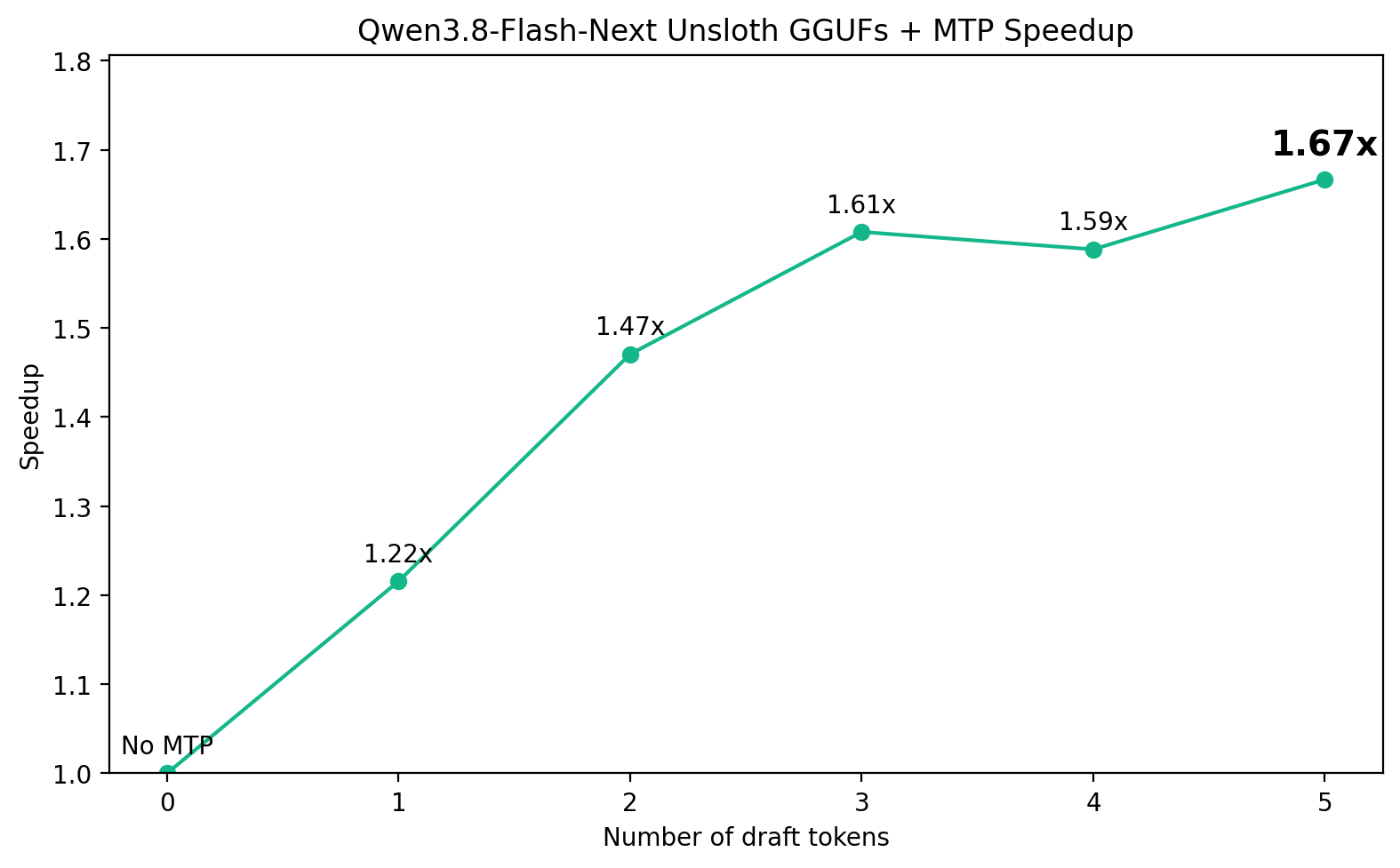
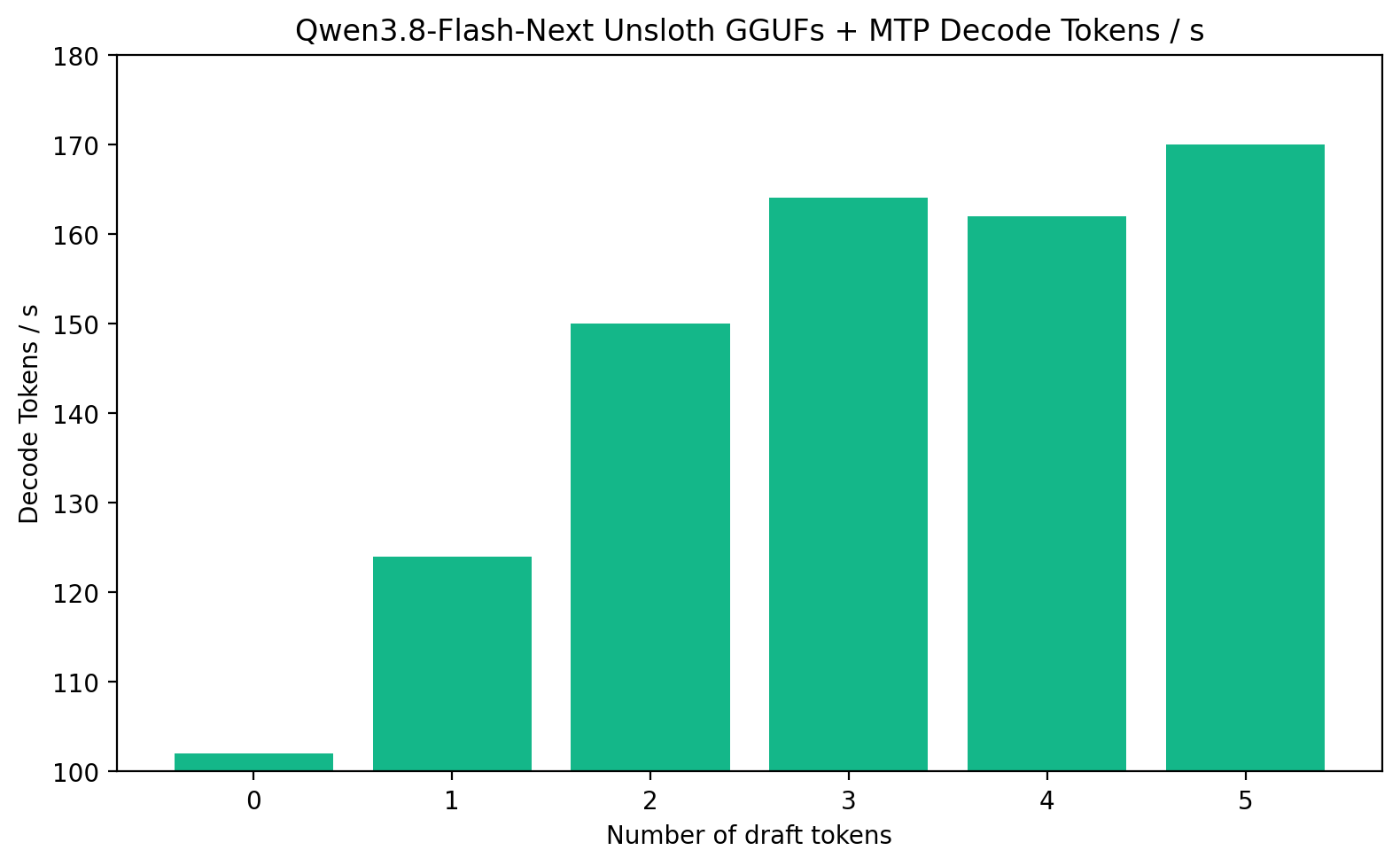
Standard autoregressive decoding generates one token per forward pass, bottlenecked by memory read bandwidth. Multi-Token Prediction (MTP) enables the model to predict multiple future tokens simultaneously during each decoding iteration. When combined with speculative verification, MTP yields a 1.3x to 1.7x speedup with zero accuracy degradation.
On a single workstation GPU (such as an NVIDIA RTX 6000 Ada / PRO), MTP elevates generation throughput from the 100 token/sec baseline up to 170 tokens/second:
Shared MTP Modules vs. General MTP
To prevent duplicated weights from consuming precious VRAM, shared MTP modules omit the duplicated embed_tokens matrix, reusing the primary model's token embeddings instead:
| MTP Quantization | General MTP Size | Shared MTP Size | Memory / Disk Savings |
|---|---|---|---|
BF16 |
7.77 GB | 5.23 GB | 2.54 GB |
Q8_0 |
4.14 GB | 2.79 GB | 1.35 GB |
Q4_K_M |
2.79 GB | 1.91 GB | 880 MB |
MTP Total Hardware Footprint
Accounting for both base model checkpoints and shared MTP speculative draft weights:
| Quant Level | 1-bit | 2-bit | 3-bit | 4-bit | 5-bit | 8-bit | BF16 |
|---|---|---|---|---|---|---|---|
| Combined Memory | 76 GB | 80 GB | 91 GB | 97 – 115 GB | 164 GB | 200 GB | 355 GB |
Step-by-Step MTP Setup with llama.cpp
1. Compile MTP-Enabled llama.cpp
Clone the MTP-specialized branch and build the server binary:
apt-get update
apt-get install pciutils build-essential cmake curl libcurl4-openssl-dev -y
git clone --branch qwen4exp/mtp https://github.com/danielhanchen/llama.cpp
cmake llama.cpp -B llama.cpp/build \
    -DBUILD_SHARED_LIBS=OFF -DGGML_CUDA=ON
cmake --build llama.cpp/build --config Release -j --clean-first --target llama-cli llama-mtmd-cli llama-server llama-gguf-split
cp llama.cpp/build/bin/llama-* llama.cpp
2. Download the Shared MTP Module
Using the official Hugging Face CLI, download the shared 8-bit MTP draft module:
pip install -U "huggingface_hub[cli]"
hf download unsloth/Qwen3.8-Flash-Next-GGUF \
    --local-dir unsloth/Qwen3.8-Flash-Next-GGUF \
    --include "*mtp-Qwen3.8-Flash-Next-shared-Q8_0.gguf*"
3. Launching llama-server with MTP Speculative Decoding
Start llama-server, binding the main model checkpoint to the speculative draft model with a maximum draft horizon of 5 tokens:
llama.cpp/llama-server \
    -hf unsloth/Qwen3.8-Flash-Next-GGUF:UD-Q4_K_XL \
    -md unsloth/Qwen3.8-Flash-Next-GGUF/MTP/mtp-Qwen3.8-Flash-Next-shared-Q8_0.gguf \
    --spec-type draft-mtp --spec-draft-n-max 5
The server exposes an OpenAI-compatible HTTP endpoint (defaulting to port 8080) that seamlessly accelerates all completions and chat requests.
Frontier Benchmarks
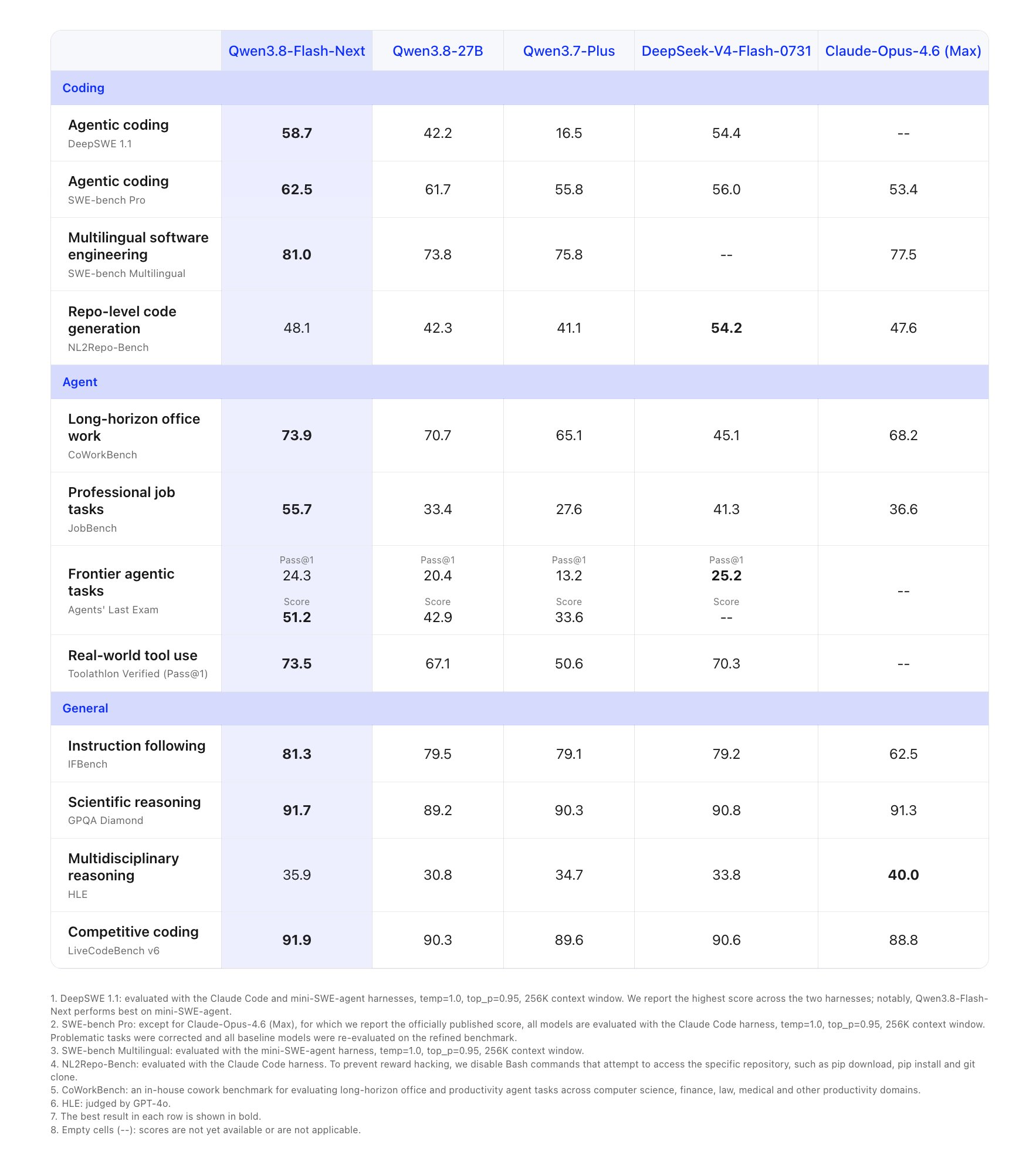
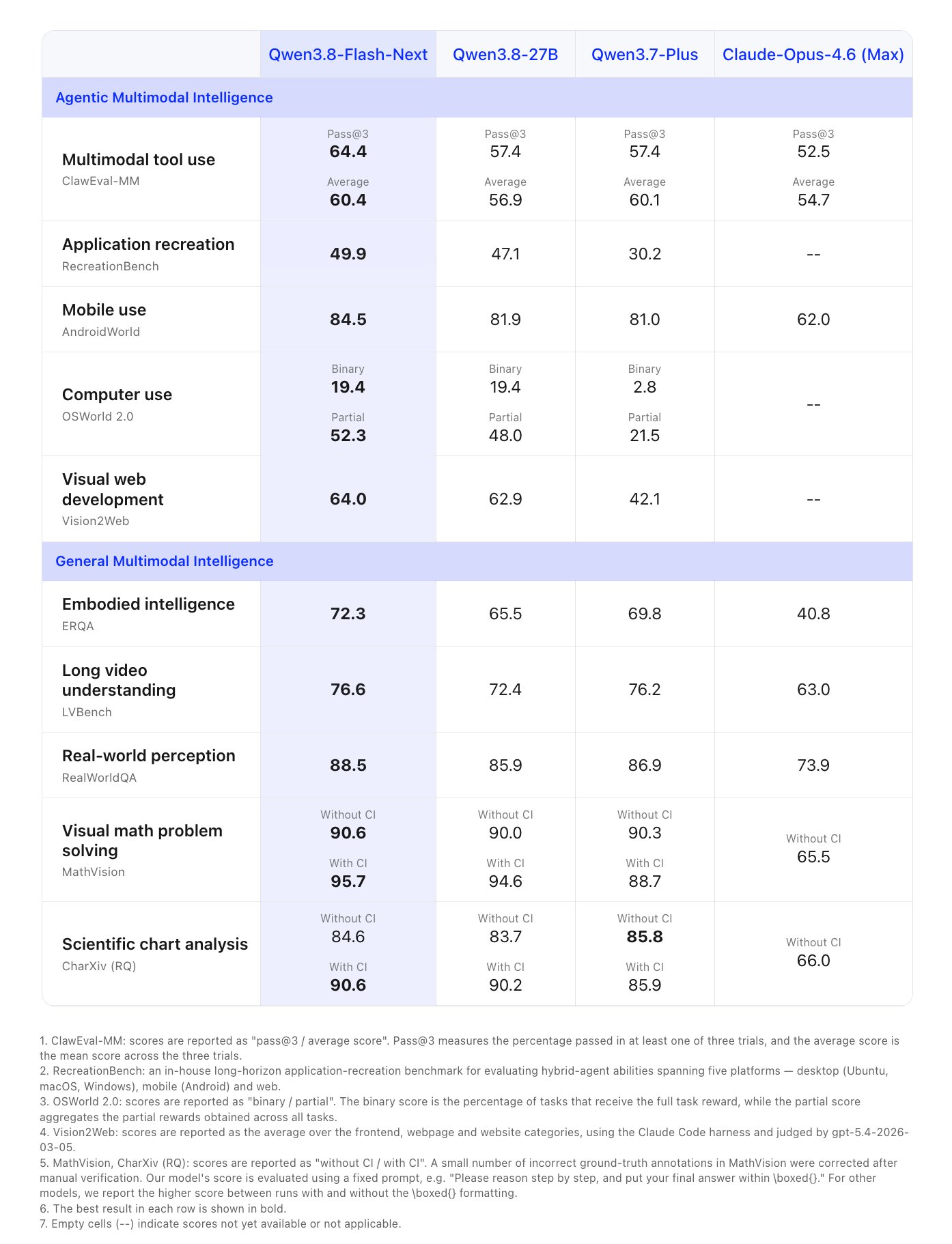
Qwen3.8-Flash demonstrates top-tier performance against both contemporary frontier models and large open-weight baselines across math reasoning, code generation, and multi-turn tool calling:
Summary & Related Local AI Workflows
By combining Per-Layer Embeddings with Multi-Token Prediction speculative decoding, Qwen3.8-Flash unlocks high-throughput, high-context reasoning on accessible workstation hardware. Whether hosted on a 96 GB Apple Mac Studio via Unsloth Desktop or served across enterprise clusters using llama-server, it represents one of the most capable local models available.
For further exploration of local inference architectures and fine-tuning pipelines:
- Review our comprehensive Complete Developer Guide to Local LLMs in 2026 for orchestration comparisons.
- Learn how to adapt small models to specialized tasks in our LoRA Fine-Tuning & GGUF Deployment Guide.
- Explore zero-dependency local runners in our Self-Hosted LLM Architecture Guide.
Related Guides
ThinkingCap-Qwen3.8-27B Cuts Thinking Tokens 37.2% for 0.86pp Accuracy
BottleCap AI's fine-tune of Qwen3.8-27B drops thinking tokens 37.2% across 12 benchmarks, losing just 0.86pp of macro accuracy at xhigh effort.
Fine-Tuning LLMs with LoRA: A Complete Practical Guide to Training & GGUF Deployment
Master end-to-end LoRA fine-tuning for SLMs: synthetic data generation, benchmarking against 7B baselines, lit-gpt training, and GGUF serving with llama.cpp.
2.4T-Parameter Qwen3.8 Runs on One Node With vLLM and NVFP4
AWS documents a single-node serving path for Qwen3.8-2.4T-A95B on a p6-b300 instance using NVFP4 quantization, cutting TTFT by nearly 60%.